| Author |
 Topic Topic  |
|
|
ullix

Germany
1255 Posts |
 Posted - 07/04/2026 : 05:08:20 Posted - 07/04/2026 : 05:08:20


|
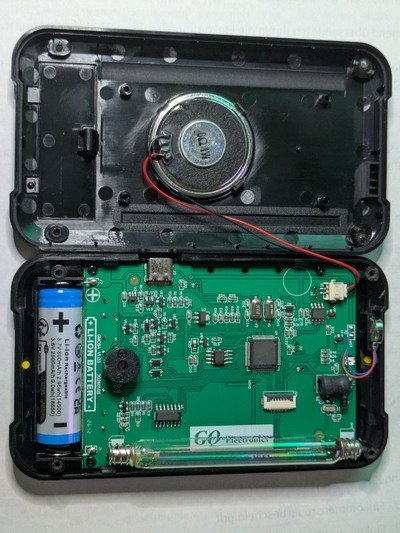
The GMC-800 is being sold now in a fully new hardware version. It reports itself as GMC-800Re2.00, and is incompatible with previous versions of GeigerLog and RadPro!
GeigerLog has now been adapted; its latest version is available as a pre-release on GeigerLog's development site. Use pre08 or later:
https://sourceforge.net/p/geigerlog/discussion/devel2/
The use of a new microchip raises hopes for getting fast performance. Well, the opposite was the case! For the first time ever I had in insert delays (!) at various stages of the GeigerLog code, just to accomododate this one counter. Imagine, even the old GQ clunkers GMC-300 were faster!
Adapting RadPro might take a bit longer; GQ has resorted to grinding off all labels on the chips, which does throw a few extra wrenches into anyone's attempts to create alternative firmware. 
And the much dreaded FET "feature" has been runied even further. The picture shows the outcome for a Poisson test for FET=5 in the top pic. This is supposed to look like the bottom pic, which is the History read out from the very same GMC-800Re2.00. The data are there; they are just ruined by GQ's infamous algorithm !
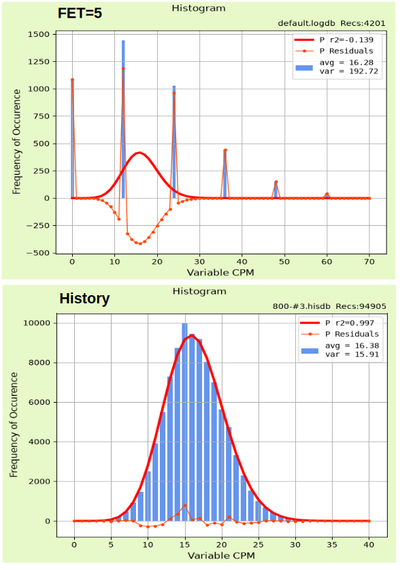
Draw your own conclusions.
|
|
| Reply #1
ullix
Germany
1255 Posts |
Posted - 07/07/2026 : 00:54:44
|
This counter keeps buggy surprises: Every now and then it shows a bold message across the screen, reading:
WiFi Busy ...
To my knowledge, this GMC-800Re2.00 counter does NOT have WiFi? So, just another bug? |
 |
|
| Reply #2
BrianBurns

1 Posts |
Posted - 07/09/2026 : 04:20:28
|
| All good now? |
:) |
Edited by - BrianBurns on 07/09/2026 04:21:08 |
|
|
| Reply #3
ullix
Germany
1255 Posts |
Posted - 07/10/2026 : 00:05:36
|
| No. |
|
|
| Reply #4
Vulture1_SK
1 Posts |
Posted - 08/07/2026 : 07:54:58
|
quote:
Originally posted by ullix
This counter keeps buggy surprises: Every now and then it shows a bold message across the screen, reading:
WiFi Busy ...
To my knowledge, this GMC-800Re2.00 counter does NOT have WiFi? So, just another bug?
Same bug here. When I download recorded data using the GQ’s PC software, the same “WiFI busy…” message appears despite the device being connected to my computer via USB. It’s however far from the only bug I have observed.
Here are other issues I have found:
Issue #1: When the alarm is triggered and I press any button, the alarm for some reason stops sounding despite the dose rate still being above the alarm threshold I selected. I couldn’t find anything about this in the user manual so I assume it’s not an intentional design choice. I don’t have any samples to test the device on so I tested it by setting an alarm threshold to a value that was below my background CPM. The problem is that I can’t seem to find a way to re-engage the alarm after a button press cancels it.
Issue #2: The LED blinks green, yellow, and red depending on the registered CPM/dose rate, but it completely ignores the alarm threshold set by a user meaning that if you set the alarm threshold to let’s say 0.5#956;Sv/h, the LED will still blink green when counts are registered due to apparently hardcoded thresholds that determine what color it blinks. The LED appears to be changing color based on the color bar in the “Dose Rate” section.
Issue #3: The “color bar” in the “Dose Rate” section is in my opinion slightly confusing. The yellow “Nuclear Radiation Safety Guide” card included with the device as well as the built in “Reference Guide” (in the “Main Menu”) both say that dose rate in the range of 0.33#956;Sv/h to 0.65#956;Sv/h is “Medium”. However, on the “color bar”, that “Medium level” is represented by a light green color. I personally think it would make more sense for the “Medium level” to be represented by a yellow color instead, but that’s just my opinion. I would in fact not even consider it a problem since I am interested in numerical values on the display as opposed to a color bar that’s meant to indicate safety, but if the device is meant to be used by a person who doesn’t have any idea of what levels are considered safe, I think they could misinterpret the color bar.
Issue #4: When I power on the device and the startup screen appears, there’s a weird displaying error resembling a sort of “scan line effect”. The same issue appears when I select the “Dark” color theme.
Issue# 5: You cannot set an alarm threshold for accumulated dose. It might not be an issue for all people, but it’s something that I would like to have.
I really hope that a compatible RadPro version comes out soon as I find the stock firmware problematic for the reasons I mentioned.
There’s a model name as well as what appears to be a manufacturing date printed on the motherboard (above the printed battery icon), if anyone’s interested, my unit is a “GMC8A_v1.03” with firmware version “Re2.00”. |
|
|
| |
Topic |
|
|
|



 GMC-800Re2.00 - new Hardware incompatible and slow
